JAIPilot / Verify
Verify your code before you ship it.
A testing agent that verifies your code. Run it after a change is made: Verify tests the new code, checks existing behavior for regressions, and lets you decide what should happen before it reports the result.
For changes made by you or your coding agent. Run Verify before you commit.
Baseline → intent → final tests → report
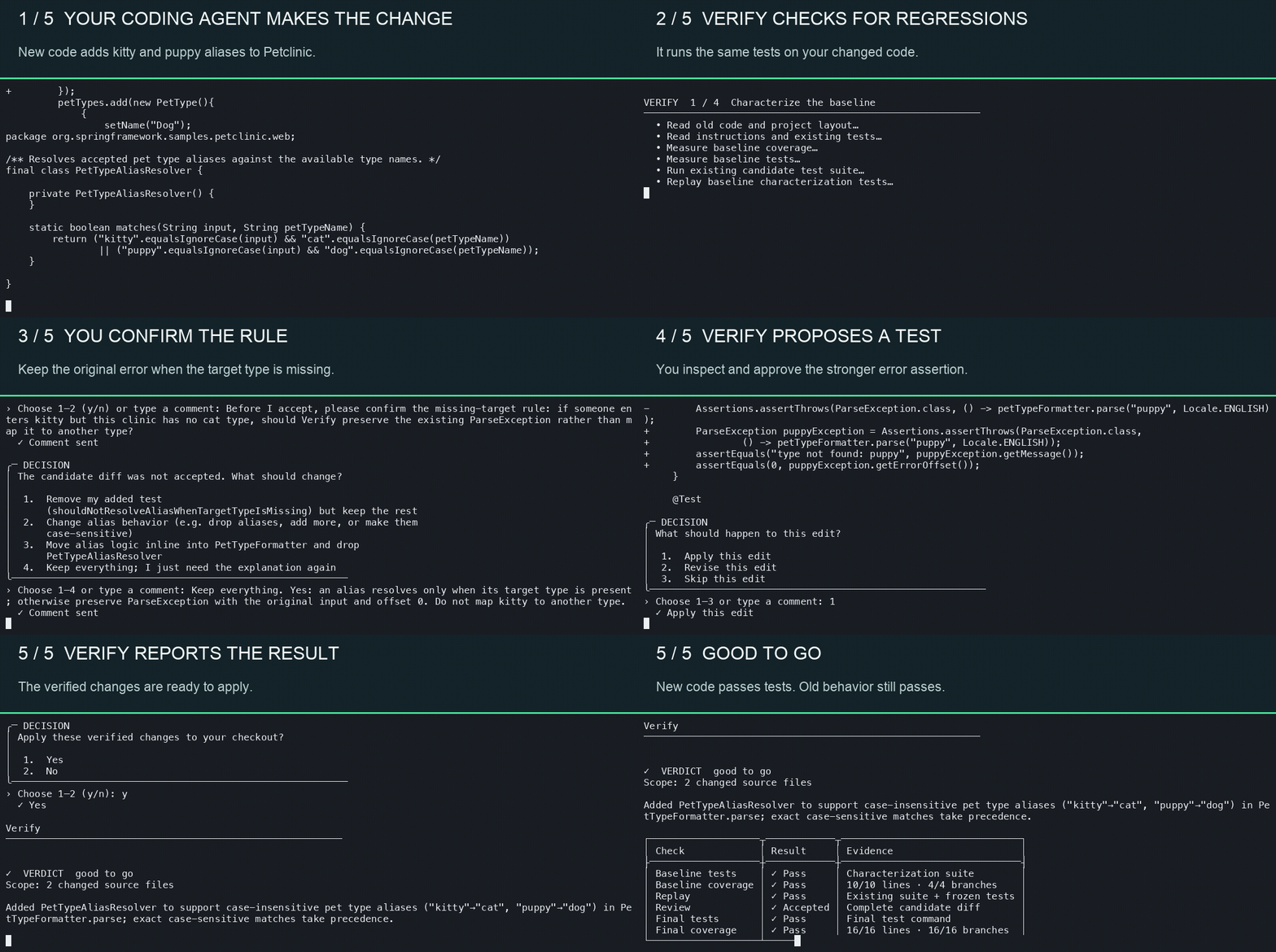
One change. One real run.
Watch Verify on Spring Petclinic.
A coding agent added kitty → cat and puppy → dog using a new resolver and a change to the existing formatter. Verify then checked the new behavior and whether the old behavior still held.
How it works
A review between coding and committing.
Verify works from your Git change. It keeps the baseline and candidate in separate worktrees, so you can inspect the result before accepting edits.
- 01
Establish the baseline
Verify tests affected behavior before your change, then replays those tests against the code you wrote.
- 02
Review what changed
It separates intended changes from possible regressions, asks when intent is unclear, and previews proposed edits.
- 03
Lock the agreed behavior
After you accept the candidate, Verify adds tests for the new behavior and runs the project suite and coverage checks.
- 04
Read the evidence
Get a verdict, the test and coverage results, and the complete verified diff before choosing whether to apply it.
Passing checks show the behavior they exercised. They do not prove that every possible bug is gone. Read the detailed workflow ↗
Get started
Run Verify before you commit.
Install the standalone CLI, then run it inside the Git repository that contains your change. Verify uses your JAIPilot sign-in and your project’s local build, test, and coverage tools.
Install on macOS or Linux
curl -fsSL https://raw.githubusercontent.com/JAIPilot/verify/main/install.sh | shThe installer checks the release checksum and places verify in ~/.local/bin.
Install on Windows
irm https://raw.githubusercontent.com/JAIPilot/verify/main/install.ps1 | iexRun in PowerShell. Open a new terminal after installation so the updated user PATH is available.
Run it in your project
verify auth login
verify
Have Git and your project’s build, test, and coverage tools ready. Verify shows questions and proposed edits for your review.
Local execution / user review
See the work. Decide on the diff.
Builds, tests, and file edits run in local worktrees. Verify sends the relevant diff, requested file contents, and command output to JAIPilot and its model provider. You review proposed edits and choose whether to apply the final verified diff.